


Many PC tweaks try to sound convincing. Change a registry key, disable a Windows feature, adjust a setting and then boom, call it an FPS boost.
That is not enough for Hone.
Before we add an optimization, we need to understand what it changes, why it could help, and how we can test it. If we cannot answer those questions, we do not ship it.
The short version
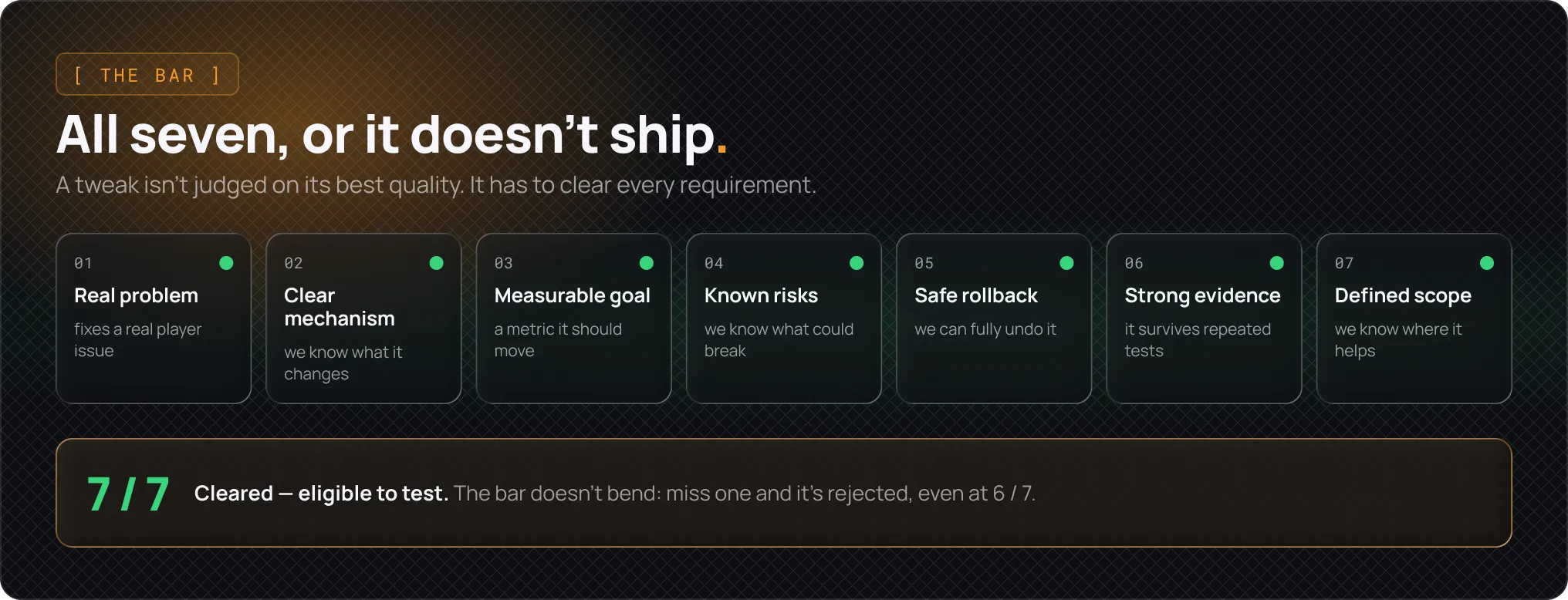
Every Hone optimization needs:
- A real problem to solve
- A clear explanation of what it changes
- A measurable goal
- Known risks
- A safe way to undo it
- Evidence strong enough to justify the change
- A clear definition of which systems may benefit
A tweak does not need to help every PC, but it does need to make sense and avoid creating a larger problem than it solves.
On smaller screens, focus the figure and use the arrow keys or swipe to pan horizontally.
1. Start with the problem
To start, we begin with normal issues that a player may notice which could be:
- Stutters caused by background activity
- Unstable frame times
- High input latency
- Disk activity causing hitches
- Network latency under load
- Apps competing with the game for CPU or memory
If we cannot describe the problem, the tweak automatically gets rejected.
“This setting exists” is not a reason to change it. “This setting controls behavior that may be causing latency during gameplay” is something we can investigate.
2. Understand what the tweak changes
Every optimization needs a direct explanation.
We should be able to answer:
- What part of Windows does it affect?
- What behavior changes after it is applied?
- Why could that affect gaming?
- Which systems are likely to benefit?
Take our device affinity tweak as an example, which changes how certain hardware work is assigned across CPU cores. On some systems, moving that work can reduce contention and latency.
This does not prove that the tweak always helps but it does give us a mechanism to test.
If we cannot explain the mechanism, we treat the tweak as guesswork.
3. Find the risk
We look for what could go wrong before we look for a performance gain.
Depending on the change, an optimization could affect:
- Stability
- Frame pacing
- Input latency
- Drivers and connected devices
- Game launches
- Anticheat compatibility
- Power use and temperatures
- Windows updates
Some changes are easier to control than others. Reducing background activity during a game session is easier to reverse than changing low-level device behavior.
A higher-risk tweak is not automatically rejected. It does need stronger evidence, narrower targeting, and a reliable rollback.
If we cannot safely undo a change, we do not treat it casually.
4. Define what success means
Not every optimization is meant to increase average FPS.
A tweak may instead reduce stutter, improve frame pacing, lower input latency, reduce background activity, or stabilize network performance.
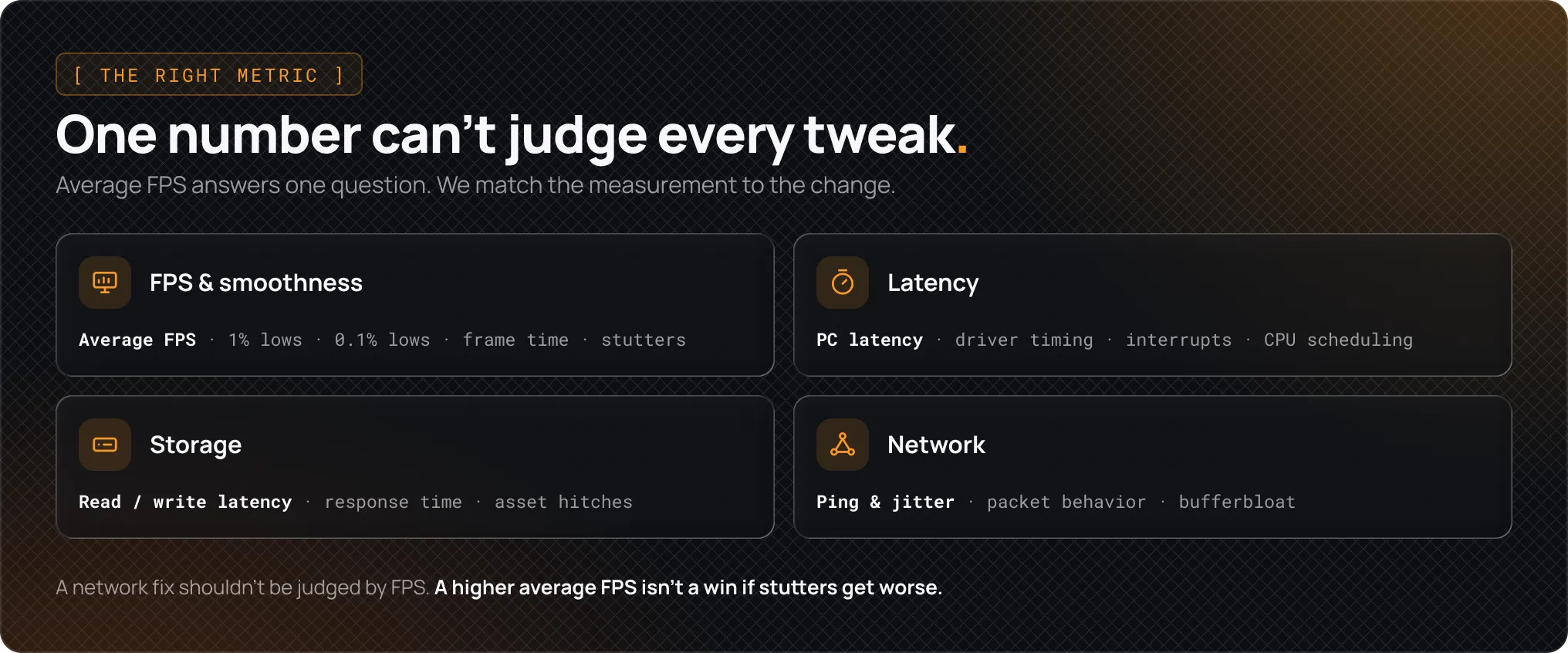
We choose the test based on the claim:
- FPS and smoothness: Average FPS, 1% lows, 0.1% lows, frame times, and stutters
- Latency: Measured PC latency, driver timing, interrupt behavior, or CPU scheduling
- Storage: Read and write latency, response time, and asset-loading hitches
- Network: Ping, jitter, packet behavior, and bufferbloat
This matters because the wrong measurement can make a weak result look successful.
A network change should not be judged by FPS. A latency improvement should not be dismissed because average FPS stayed the same. A higher average FPS is not a win if stutters become worse.
On smaller screens, focus the figure and use the arrow keys or swipe to pan horizontally.
5. Run controlled tests
PC performance is noisy.
Results can change because of shader compilation, Windows tasks, temperatures, background apps, different maps, server conditions, or even where the player looks during a test.
We control as much of that as possible:
- Same PC and hardware
- Same game, map, scene, route, or replay
- Same graphics settings
- Same Windows and driver versions
- Same power plan
- Same background apps
- Same capture method and test length
- Same FPS cap and sync settings
- Same restart conditions
We also test one change at a time. If five tweaks are enabled together, we cannot tell which one helped or caused a problem.
One good run is not enough.
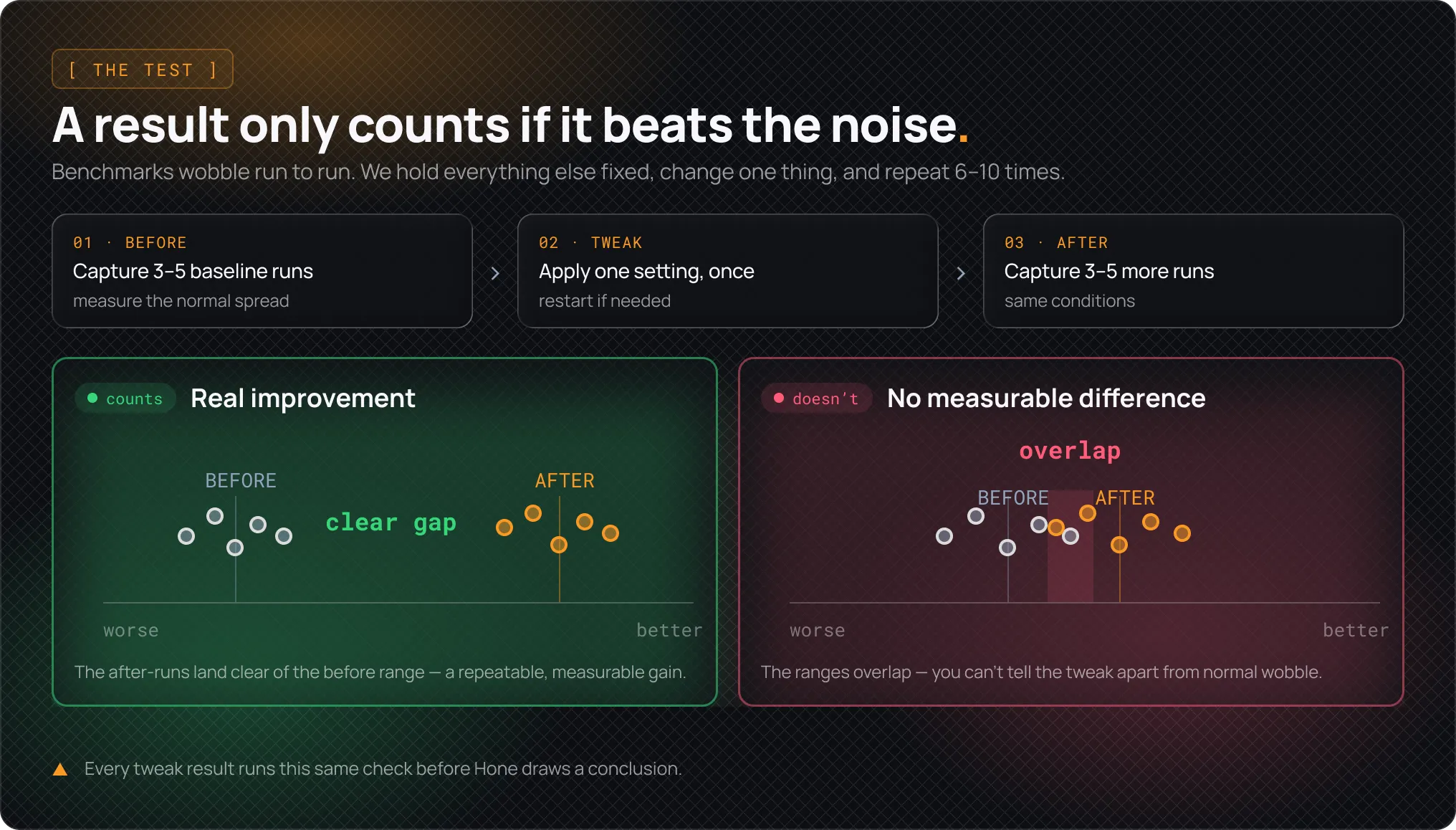
For each PC, we run the baseline test three to five times before applying the tweak. Then we apply the tweak once, restart if needed, and run the same test three to five times after.
That means every before-and-after comparison includes six to ten total runs per PC. Repeating the test helps us account for normal variation and identify results affected by shader compilation, caching, or other temporary conditions.
Before comparing the results, we look at how much the baseline runs vary from one another. A tweak only counts as an improvement when the after results are better than that normal baseline variation and the change appears consistently across multiple runs.
If the before and after results are too similar, the conclusion is “no measurable difference.”
Every tweak goes through this same process before we draw a conclusion. If the result cannot survive repeated testing, we do not call it an improvement. This is where Hone separates itself from most optimization tools.
On smaller screens, focus the figure and use the arrow keys or swipe to pan horizontally.
6. Compare the result with the risk
A measurable improvement is not always worth shipping.
A small, repeatable gain from a low-risk change may be useful. The same gain may not justify a change that could cause crashes, stutters, or device problems.
We review the full result:
- How large was the improvement?
- Did it repeat?
- Did frame-time consistency improve?
- Did latency improve?
- Did another metric become worse?
- Did the system remain stable?
- Can the change be reversed?
- Does it only help certain hardware or games?
The question is not simply whether a number increased. The benefit must justify the change.
7. Define where it helps and where it does not
Most optimizations have conditions.
A tweak may help when:
- The game is CPU-limited
- Background apps are competing with the game
- The system has driver latency spikes
- Storage activity is causing hitches
- The CPU is older or has fewer available resources
- Network latency increases while the connection is busy
That does not make the tweak weak.
We would rather make a specific claim we can support than promise an FPS boost to everyone.
8. Keep it, change it, or reject it
Every optimization ends in one of three places.
Keep
We keep it when:
- The mechanism is clear
- The intended metric improves
- The result repeats
- The risk is justified
- The change is reversible
- We know where it should be used
“Acceptable risk” does not mean no risk. It means the possible downside is limited, understood, and recoverable.
Change
Sometimes the idea is sound, but the implementation is not ready.
The tweak may improve one metric while hurting another. It may need to target specific hardware or games. It may also need better settings or a safer rollback.
A positive benchmark does not automatically mean we ship it.
Reject
We reject a tweak when:
- We cannot explain what it changes
- The result does not repeat
- The benefit is too small to matter
- It causes instability or stutters
- The compatibility risk is too high
- It cannot be safely reversed
- The evidence does not support the claim
Rejecting a tweak is always a part of the process, whereas shipping an unproven one is the failure.
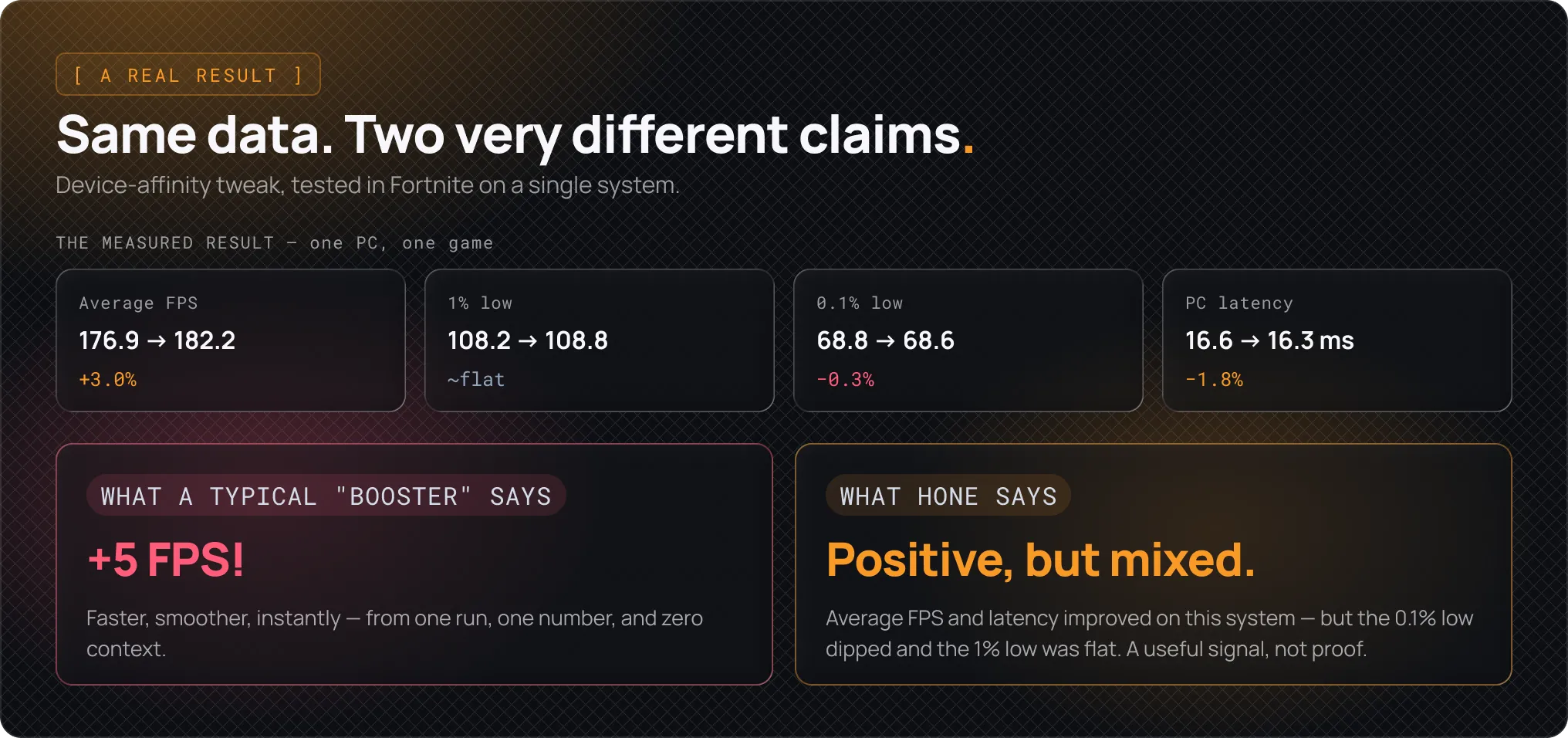
For example: Device affinity
We tested this optimization in the same way this article describes. Same setup, scenarios and settings, with five captures before applying the tweak, and five captures after. The results showed a small increase in average performance from roughly 177 FPS to 182 FPS. Average frame time and measured PC latency also improved slightly.
Instead of prematurely claiming that “this tweak boosts FPS”, we came to this conclusion:
On this system, the tweak improved average FPS and measured PC latency. More testing is needed before making a broader claim.
On smaller screens, focus the figure and use the arrow keys or swipe to pan horizontally.
What Hone does not claim
Hone does not claim that every optimization improves every PC.
One benchmark cannot prove that a tweak works across different games, hardware, drivers, and Windows versions. We also do not modify game memory, anticheat files, or other sensitive game files to produce performance gains. Performance should not depend on broad technical-sounding claims.
Our goal is not to build the longest list of tweaks. Instead we selectively pick changes we can explain, test, target, and reverse.
That is the standard we want every Hone optimization to meet.
Citation
Hone Research (2026). How Hone Evaluates Performance Tweaks. Hone Research. https://hone.gg/research/how-an-optimization-gets-added-to-hone